Software Hubs

KMPlayer 3.2.0.12


KMPlayer - is a versatile player who can play almost any media formats, such as: VCD, DVD, AVI, MKV, Ogg Theora, OGM, 3GP, MPEG-1/2/4, WMV, RealMedia, QuickTime and others. The program also understands the subtitles on DVD discs and can record audio, video or images of any part of the playing piece. The player can work with internal and external filters and plug-in that enables you to control audio and video files playable settings. KMPlayer includes almost all the major codecs for playback of video and audio. 
KMPlayer has  a simple and minimalist interface makes video playback quick and hassle-free, player’s interface is fully skinable, and even user can setting it to changing the player interface’s colour on every new track.

Features:
"Playing video and audio formats
"Built-in codec lets you play files without installed codecs
"Playing nedokachannyh and" broken "files
"The ability to store settings in the registry, and in the configuration file
"The ability to use the program as a portable player
"Support for Subtitle formats
"Integrated subtitle editor
"The ability to play an external audio track
"The ability to use plug-in for Winamp
"The ability to change skin interface
"Capture video (no audio or her) / audio file
"The ability to play a certain segment of the material
"Multilingual interface with support for Russian and Ukrainian languages.  


Operating system
Windows All
Download

DivX Play 8.2.2


Using DivX Play you can watch  high-quality digital videos on your computer, including HD H.264 (.mkv) videos with AAC audio and videos created using all previous versions of DivX technology. You can also play your DivX files (.divx, .avi) on millions of DivX Certified® devices today. Look for DivX...

 Features of  DivX Play
• Convert your video, including HD files, to DivX video using DivX Converter, or create video compilations with DVD features using DivX Author
• Post a DivX video to your site using DivX Web Player
• Watch your videos, even HD videos (H.264/AAC) from the Internet, with DivX Player
• Stream your videos, photos, music and Internet video (e.g. YouTube) to your TV with DivX Connected™
• Burn a video to disc for playback in a DivX Certified DVD player
• Copy a video to a USB drive or a SD card and watch it on a DivX Certified TV
• Watch your videos anywhere your phone goes
• Shoot your own video with a DivX Certified digital camera or mobile phone
• Travel in style with video playback on any DivX Certified portable media player or in-car media player

Operating system 
Win XP/2003/08/Vista/Windows7
Download


Download RealPlayer


latest free real player|free latest vlc player|latest real player 12|latest real player free download full version|latest version of real player|real player 12 free download|latest vlc player,latest real player for windows 7|latest real player 2011|latest real player 12 free download

Real player is used for looking to play videos, download videos from the web, or you want to convert the format of a video, RealPlayer is sure to meet your needs

Feature of real player
1.Download video faster
Download videos up to three times faster from your favourite video websites
2.Transfer video faster
Transfer video to your Smartphone up to 50% faster with RealPlayer Plus 15.
3.Burn DVDs for TV
Collect and watch your favourite high quality video downloads
on TV by transfering to DVD.
4.TV & Movies
Access to premium video content and Enjoy movies and TV shows online, on-demand.

Operating System
Windows All

 Download
Download AVI Player 3.0


1.Avi Player is a simple player that can find and install correct codec if you don't have on your machine and play avi file. It is simple to use and easy to install, It allows you to open and play an avi video file within three click.
2.AVI players provide a lot of viewing opportunity for users. There are free AVI players as well as download for a fee players. They all work on the same principle, but can be customized for preferred viewing. AVI players bring another level of entertainment to users. Players loaded on a laptop makes it possible to view videos anywhere and not just in the comfort of a living or television room.

AVI Player Features
-100-percent free avi player
-Based on open-source VLC Player
-AVI player supports shockwave flash
-AVI player program is simple, easy-to-use
-Comes with a user-friendly interface
-Designed to play AVI files
-Free avi player supports all video
formats-AVI,MP4,MKV,WMV,VOB,etc

Operating System
2003/XP/2000/98/Me
Download


Download Shockwave Player 11.6.3.633


Shockwave Player is a multimedia playback. The Shockwave Player allows you to view interactive web content like games, business presentations, entertainment, and advertisements from your web browser. After installing the Adobe Shockwave Player and you will have access to some of the best content the web has to offer including dazzling 3D games and entertainment, interactive product demonstrations, and online learning applications.

Features of Shockwave Player 11.6.3.633
1)It allows the reproduction of files created with the Macromedia Flash, Macromedia Flex, or other Macromedia tools: SWF files, such as 3D games, view product demos, use online education platforms, and more.
2)The shockwave player displays web content that has been created by Macromedia Director, including content made with previous versions and Director MX 2004.

System Requirements:
Windows XP / 2003 / Vista / Windows7 / XP64 / Vista64 / Windows7 64
Download

Download HyperCam 2.25.01


It is an app that allows you to video capture the action from an area of your PC desktop. HyperCam is powerful video capture software that records AVI movies (screencam) directly from your monitor, for software presentations, software training, demos, tutorials, and fun! HyperCam supports text annotations, sound, and screen notes (great for creating automated software demos!). You can also select Frame rate and compression quality prior to video capture.

Features of HyperCam:
•Easy precision visual screen area or window selection
•Unique panning mode lets your area follow your cursor
•Multiple video compression choices
•Optionally annotate your movies with pop-up text boxes, when recording
•Optional sound, with choices for recording quality
•Capture in any screen color depth
•Automatically incrementing file names for captures
•Frame rate, compression, and key frame choices
•Convenient, user-definable hot keys.
•Integrated playback buttons
•Mouse cursor recording can be turned on or off, true shape of the cursor is recorded
•Optional "starburst" recording on mouse click, customized for size, color and duration
•Optional recording of mouse sound clicks
System Requirements:
Win XP/Vista/7
Download


Download iCoolsoft DVD to iPad Converter 5.0.6


iCoolsoft DVD to iPhone Converter is best DVD movie to iPhone video converting tool, which can convert DVD to iPhone MP4, H.264, MOV videos or MP3, M4A, AAC, audio files. It allows you to enjoy DVD movies on iPhone 3G, iPhone 3GS and all kinds of iPod.

Features:
1)Converter
This tool can rip movies from DVD and convert to iPhone supported MP4, H.264, MOV, M4V video or MP3, AAC, M4A, WAV, AIFF audio.
2)High compatibility
This tool can not only convert DVD to iPhone, iPhone 3G, but also rip DVD to iPod, iPod touch, iPod classic, iPod nano, Apple TV, iPad 2, etc.
3)Unique converting features
DVD audio track and subtitle are selectable in this tool, and you can convert DVD movie to videos with different formats, resolution, etc. at the same time.
4)Video quality
You can choose to use the default settings or manually adjust all encoding settings such as Video Encoder, Resolution, Frame Rate, Video Bitrate, Audio Encoder, Sample Rate, Channels, Audio Bitrate, etc.
5)Setting output effect
The output video effect can also be adjusted by setting video Brightness, Contrast, Saturation, Deinterlacing, etc. The effect can be previewed in real time.
6)Capture picture
When you preview the source movie, you can click Snapshot button to quickly save the current screen as image files in JPEG, GIF or BMP format.
7)Video cutter and joiner
Besides selecting any chapter of the DVD movie to convert, you are also allowed to trim video to get any segment.

System requirements:
Win98, Windows2000, Win XP, Windows2003, Windows Mobile 2003, Windows Mobile 2005, Windows 7, Windows 7 x64, Windows Vista, Windows Vista x64
Download


Download MpcStar 4.8


You can play virtually all formats out there, and you could do it just with a single double click, which means it is address to both beginners and those more experienced.MPCSTAR is a full package of Video Player and Codecs. It contains a user-friendly player frontend and carefully seletected codecs that all a normal user may ever need. With MPCSTAR, you should be able to play all your movies.

Feature
•It is very user-friendly and easy-to-use, especially suitable for novice users.
•It always block pop-ups of unwanted ads that in the movies.
•It has been very well tested, so that the package doesn't contain any conflicting
•It is a complete package, containing everything you need to play your movies that you download from the internet.
•It it always up-to-date with the newest or best versions of the components.
•It is completely free and do not contain any spyware or adware.

Operating system
Window All
Download

Download Debut Video Capture 1.64 Beta


About Debut Video Capture
Capture video files directly on a PC from webcam, external devices or record your computer screen. Record video from a web cam, video capture device, desktop or portion of your screen and save to avi, flv, wmv and more. Capture snapshots of a video and save them to jpg. Adjust framerates, brightness, contrast and add text and captions.

Features of debut video capture
•Capture video directly to your hard drive.
•Record video in many different file formats including .avi, .wmv, .flv, .asf, .mpg, ,3gp, .mp4, .mov and more.
•Record from your webcam, screen or video input device (eg. VHS recorder).
•Record almost anything - anything you can see on your monitor can be recorded.
•Record video and audio simultaneously.
•Create photo snap-shots at any time.
•Add your own text captions or time stamp your video.
•Change colour settings and video effects before recording.
•Adjust the video resolution, size and frame rate for capture.
•Ability to burn directly to DVD with Express Burn DVD Recorder.
•Works with BroadCam Streaming Video Server to stream over the internet

System Requirements
•Works on Windows XP 2003/Vista/2008 and Windows 7
Download

Download Freemake Video Converter 2.4.0.6


About Freemake Video Converter
It is Convert video free to AVI, MP4, WMV, MKV, SWF, 3GP, DVD, MPEG, MP3, iPod, iPhone, PSP, Android, rip & burn DVD, convert online videos directly from 40+ sites, burn Blu-ray, and upload to YouTube with free video converter. Create photo slideshows and music visualizations. Extract MP3. Cut, join, flip, rotate video. Upload videos, photos, music to YouTube directly.

Features:
•Numerous Input Formats
•Conversion to iPod, iPhone, iPad, PSP, Xbox, Blackberry
•Conversion to AVI, WMV, MP4, 3GP, DVD, MP3
•YouTube Publishing
•DVD Burning
•Photo Slideshow Creation
•Video Editing

System Requirement-
•Requirements:
Windows XP / Vista / Windows 7 / XP64 / Vista64 / Windows 7 64
Download

Download Real Player 15.0.0.198


Funtion of Real Player 1.Real Player Free (formerly RealOne) allows you to play Real Media files on your computer.
2.It is suitable for watching Internet TV or listening to online radio stations.
3.And it's perfect for playing and sharing video with your friends and followers on Facebook and Twitter
4.It works easily with your favorite flavors of Blackberry, iPod, iPhone and game systems.

Feature of New Real Player:
•Innovative,single-click process to quickly download and save videos for later enjoyment.
•Download multiple videos simultaneously with Real Player, allowing people to save time and easily multitask. Users can also start downloading in the middle of watching a video, and the entire video will be captured.
•The new Real Player supports videos created in the most popular formats, including Flash, Windows Media, QuickTime, and Real.
•Easily burn videos to CD (or to DVD, using Real Player Plus). The Video CD format used by Real Player can be played in most DVD players.
•Send links of their favorite videos to your friends with a convenient "Share with a Friend" feature. The link that arrives in your friends' email will direct them to the online source of the video content their friend downloaded.
•Real Player supports both downloading and recording for popular streaming format (Windows Media, Real, and QuickTime)
•Real Player will only download/record video that is not protected by DRM (Digital Rights Management) systems.
•Real Player features an improved look and feel, a streamlined installation process and faster video playback.
•Real Player will first be released for Windows, and will work with both Microsoft Internet Explorer and Mozilla Firefox. Real plans a version for the Mac to be released later in the year.
•Download videos from thousands of Web sites with just one click
•Build your own video library and playlists
•Play all major audio and video formats
•Flash Video support
•DVD, SVCD, VCD burning and video recording

System requirement-
Windows XP / 2003 / Vista / Windows 7 / XP64 / Vista64 / Windows 764
Download

Download Xilisoft Movie Maker


About Movie Maker
Xilisoft Movie Maker is movie maker software which allows you to to make video clip and edit the videos.It is an easy to use tool which make your video into a good looking movie so that you can upload your movie on the web. It does not matter that the video is of which format ((MTS, M2TS) or popular common videos (AVI, 3GP, M4V, MPEG, MP4, RM, RMVB, FLV, VOB, MPV, MOV, DAT, ASF, and WMV) all videos can be make into your own movies for playing on multimedia devices such as iPod, iPhone, Apple TV, PSP, PS3, PMP, Mobile phone, Zune, Xbox, Wii and DS. Apart from all these quality, you can also edit you videos by using this software.
You can simply drag and drop videos to the movie list and make a movie quickly using this movie creator. With the movie editing feature, apply transitions, as well as attach music and crop the video.

•Fastest movie-maker: create from HD, camcorder, and common videos
•Edit videos: clip and trim videos, crop video images
•Enhance videos: add scene transitions, audio tracks


Installation Steps
1.Unpack
2.Install Apphttp://www.blogger.com/img/blank.gif
3.Copy both files from crack folder and paste in directory "C:\Program Files\Xilisoft\Movie Maker 6"
4.Enjoy it!!!!!!

System Requirements
OS Microsoft® Windows XP (SP2 or later), Windows Vista, Windows 7
Processor 1GHz Intel/AMD processor or above
256MB RAM (512MB or above recommended)
Free Hard Disk 50MB space for installation
Graphics Card Super VGA (800?600) resolution, 16-bit graphics card or higher
Download

Download Windows Media Player 11


Windows Media Player for Windows XP is used to store and enjoy all your music, video, pictures, and recorded TV. Play it, view it, and sync it to a portable device for enjoying on the go or even share with devices around your home, all from one place. It is a media player and media library application developed by Microsoft that is used for playing audio, video and viewing images on personal computers running the Microsoft Windows operating system, as well as on Pocket PC and Windows Mobile-based devices. Editions of Windows Media Player were also released for Mac OS, Mac OS X and Solaris but development of these has since been discontinued.

Features of windows media player
1) Simplicity In Design
2) Bring a whole new look to your digital entertainment.
3) More of the Music You Love
4) Breathe new life into your digital music experience.
5) All Your Entertainment in One Place
6) Store and enjoy all of your music, video, pictures, and recorded TV.
7) Enjoy Everywhere
8) Stay connected with your music, video, and pictures no matter where you are. Check out the new Media Sharing feature.

System requirements
Supported Operating Systems: Windows XP Service Pack 2, Windows XP Service Pack 3
Download

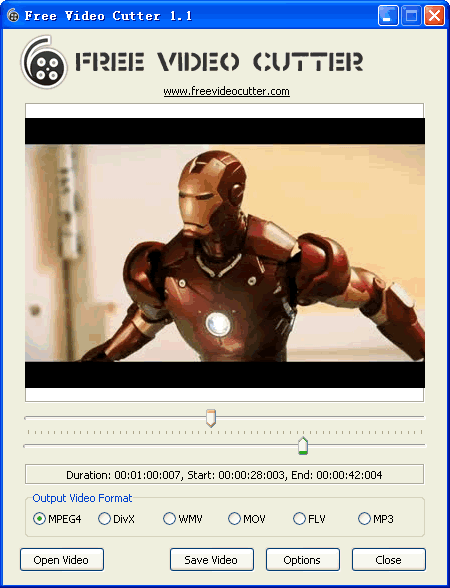
Free Video cutter Download


What is video cutter?
video cutter for all formats is a very useful software which can easily help you to cut video clips or any video. It can cut the video of any format easily. It supports MPG, VOB, DAT, AVI, DIVX, MP4, WMV, MOV, MKV, FLV and other video formats.

Video Cutter can not only provide video cutting function but also many other practical functions. For example, you can use it to create your own video files from multiple pictures, like making animated GIF. See the specific functions in the "Functions of Video Cutter" column. What's more, the newly added support for multi-Core CPU makes the video conversion much quicker.

Functions of Video Cutter


•Cut large video files into smaller clips
•Cut unwanted parts by specifying start time and end time
•Join or merge various video files into a large one
•Supports AVI, Divx, XviD, MPEG, WMV, ASF, RM, MOV, 3GP, MP4, etc. as shown below
•Very User-friendly interface
•Convert Video Files to other formats
•Convert Video Files to Audio Files
•Extract Pictures/Audio Files from Video
•Optimize the Effects of the Files
•Crop Video Size
•Add Text/Picture Watermark
•Add Subtitles to Video Files
•Convert Several Pictures into One Video
•Preview the Source Video and the Fixed Video, and compare the

System Requirement of Video Cutter

•Windows XP Service Pack 2, Windows Vista™ Home Premium/Business/Enterprise/Ultimate, Windows7
•Intel Pentium® 4, Intel Centrino, Intel Xeon, Intel Core™ Duo or other compatible processor
•512MB RAM or better
•More than 30MB free space needed
•800x600 or higher Resolution, 16 bit or higher Graphic card

Download

Audio Player, video Player - VLC Media Player


What is VLC?

VLC media player is a free software player developed by the VideoLAN project, also called "VLC" or "VideoLAN Client". IT is a project that develops software for playing video and other media formats across a local area network (LAN). It originally developed two programs for media streaming, VideoLAN Client (VLC) and VideoLAN Server (VLS), but most of the features of VLS have been incorporated into VLC, with the result renamed VLC media player.


Benefits of using vlc media player
1)It is able to stream over networks and to transcode multimedia files and save them into a various formats.
2)VLC can repair and play corrupt files, damaged or unfinished.
3)It is a highly portable multimedia player, encoder, and streamer that support many kinds of audio and video.

How to install?
.To install, Go to run >choose your language>finish

System requirements are:
• Windows, Mac OS X, BeOS
• Debian, GNU/Linux, Mandrake Linux, Fedora Core
• Familiar, Linux, YOPY/Linupy, Zaurus
• SuSE Linux, Red Hat Linux, WinCE / PocketPC

Download

Flash Player 11.0.1.152 For Internet Explorer


The latest Adobe flash player will help you watch streaming videos from your favorite video sharing sites like, YouTube, Metacafe, vimeo etc.


Applies to:
Windows 7, Vista, XP, 2000, Sever 2003 or Server 2008 (and Internet Explorer)

Requirements:
Windows 7, Vista, XP, 2000, Sever 2003 or Server 2008 (and Internet Explorer) 


Download


Software Hubs Copyright © 2011 | Site Powered By Gaurangi Infotech